
As I work for Nutanix for quite some time, June 2014 I’d started my exciting journey. As you probably noticed, mostly I’m blogging out about Nutanix platform, how-to’s, architecture, best practices and many many more.
Nutanix basics – how to check NOS version your cluster is running on?
First things first – how to check what Acropolis Operating System (AOS) my cluster is running on? There are a few ways you can check Nutanix cluster version:
#1 – How to check AOS (formerly knows are NOS) version your cluster is running – from Prism UI
Log in to Prism –> Click on the right Top on small user icon  –> About Nutanix. A new window pops up and then you can read Nutanix version, License type as well as NCC version installed on the cluster.
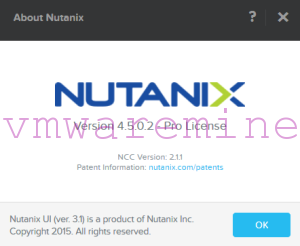
Nutanix cluster version
#2 – How to check AOS version your cluster is running – command line
sdfasd
Use ssh client and log in to CVM. Run below commands from a command prompt
nutanix@NTNX-CVM:~$ ncli

Welcome, admin
You're now connected to 00001 (test01) at 127.0.0.1

ncli> cluster version

    Cluster Version           : danube-4.5.0.2-stable
    Changeset ID              : 0d569f
    Changeset Date            : 2015-10-15 17:37:46 -0700

    ncli Version              : danube-4.5.0.2-stable
    Changeset ID              : 0d569f
    Changeset Date            : 2015-10-15 17:37:46 -0700
ncli>
You can use RestFull API call to check AOS version too. The easiest way is to download Restlet Client Google Chrome extension. Open API client and provide Nutanix Prism Element credentials and RestFull API call. See below as an example below. API call structure is as follow:
https://<CVM_IP_ADDRESS>:9440/PrismGetway/servicesrest/<API_VERSION>/command

Example output from API request:
{
     "id": "00056328-c051-f0b4-0000-000000011690::71312",
     "uuid": "00056328-c051-f0b4-0000-000000011690",
     "cluster_incarnation_id": 1516401559990452,
     "cluster_uuid": "00056328-c051-f0b4-0000-000000011690",
     "name": "nemo",
     "cluster_externals_ipaddress": "10.1.174.199",
     "cluster_external_data_services_ipaddress": "10.1.175.0",
     "cluster_masquerading_ipaddress": null,
     "cluster_masquerading_port": null,
     "timezone": "America/Los_Angeles",
     "support_verbosity_type": "BASIC_COREDUMP",
     "operation_mode": "Normal",
     "encrypted": true,
     "storage_type": "mixed",
     "cluster_functions": [
         "NDFS"
     ],
     "version": "5.10.0.2",
     "full_version": "el7.3-release-euphrates-5.10.0.2-stable-7dc1573b1dac66e8c320db1c58dedbcaa2adf052",
     "target_version": "5.10.0.2",
     "external_subnet": "10.1.174.0/255.255.254.0",
     "internal_subnet": "192.168.5.0/255.255.255.128",
     "ncc_version": "ncc-3.6.3",
     "enable_lock_down": false,
     "enable_password_remote_login_to_cluster": true,
     "fingerprint_content_cache_percentage": 100,
     "ssd_pinning_percentage_limit": 25,
     "enable_shadow_clones": true,
     "global_nfs_white_list": [
         "10.1.175.107/255.255.254.0"
     .
     .
     .
     },
     "enforce_rackable_unit_aware_placement": false,
     "disable_degraded_node_monitoring": false,
     "common_criteria_mode": false,
     "enable_on_disk_dedup": null,
     "management_servers": null,
     "fault_tolerance_domain_type": "NODE"
 }

